
Optimizing CPU Usage
Audio processing is computationally expensive. Understanding how SynthEdit handles CPU resources helps you build more efficient patches.
Full Sample Rate, and the Static-Signal Optimization
Section titled “Full Sample Rate, and the Static-Signal Optimization”Every signal in the patch — audio, and control voltages like pitch, gate, and envelopes — runs at the full sample rate (e.g., 44,100 times per second). SynthEdit has no separate, slower “control rate.” That’s deliberate: it’s what gives modulation its smoothness, with none of the zipper noise or stepped envelopes a lower-rate control path would produce.
What keeps that affordable isn’t a lower rate — it’s a cooperative optimization. A module can flag its output as static (holding steady rather than actively changing right now), and a downstream module receiving a static input can take a fast code path that assumes every sample in the block equals the held value, instead of doing real per-sample work. The SDK calls this “streaming” (isStreaming()/setStreaming() — see the C++ SDK guide): a signal that’s currently changing is streaming, a steady one isn’t, and a module can skip work whenever its input stops streaming.
A separate, much lighter category — rarely-touched configuration values like a MIDI channel selector or a checkbox — travels on Float pins instead, which only send a new value on change rather than living in the audio-rate signal path at all. See the FAQ on Audio pins vs. Float pins for that distinction; it doesn’t apply to the pitch/gate/cutoff signals that make up your patch’s actual sound, which stay audio-rate throughout.
The key lever for CPU is Sleep Mode, below — the deepest case of the static-signal optimization above: when a signal isn’t just static but silent, everything upstream of it can stop processing entirely.
Sleep Mode
Section titled “Sleep Mode”SynthEdit’s most powerful optimization is sleep mode. When a module’s input signal flatlines (becomes a constant value), the module suspends processing and uses almost no CPU.
How Sleep Mode Works
Section titled “How Sleep Mode Works”Consider a VCA controlled by an ADSR envelope:
- While a note plays, both the VCA and everything before it are active
- When the envelope’s release phase completes and the output reaches 0V, the VCA detects a flat-line input
- The VCA and all upstream modules enter sleep mode
- CPU usage drops to near zero for that voice
Designing for Sleep Mode
Section titled “Designing for Sleep Mode”- Use VCA modules for amplitude control — they properly trigger sleep mode when volume reaches zero
- Avoid Level Adj for volume envelopes — while functionally similar, the VCA is specifically optimized for sleep detection
- Place the VCA early in the signal chain so that upstream modules also sleep
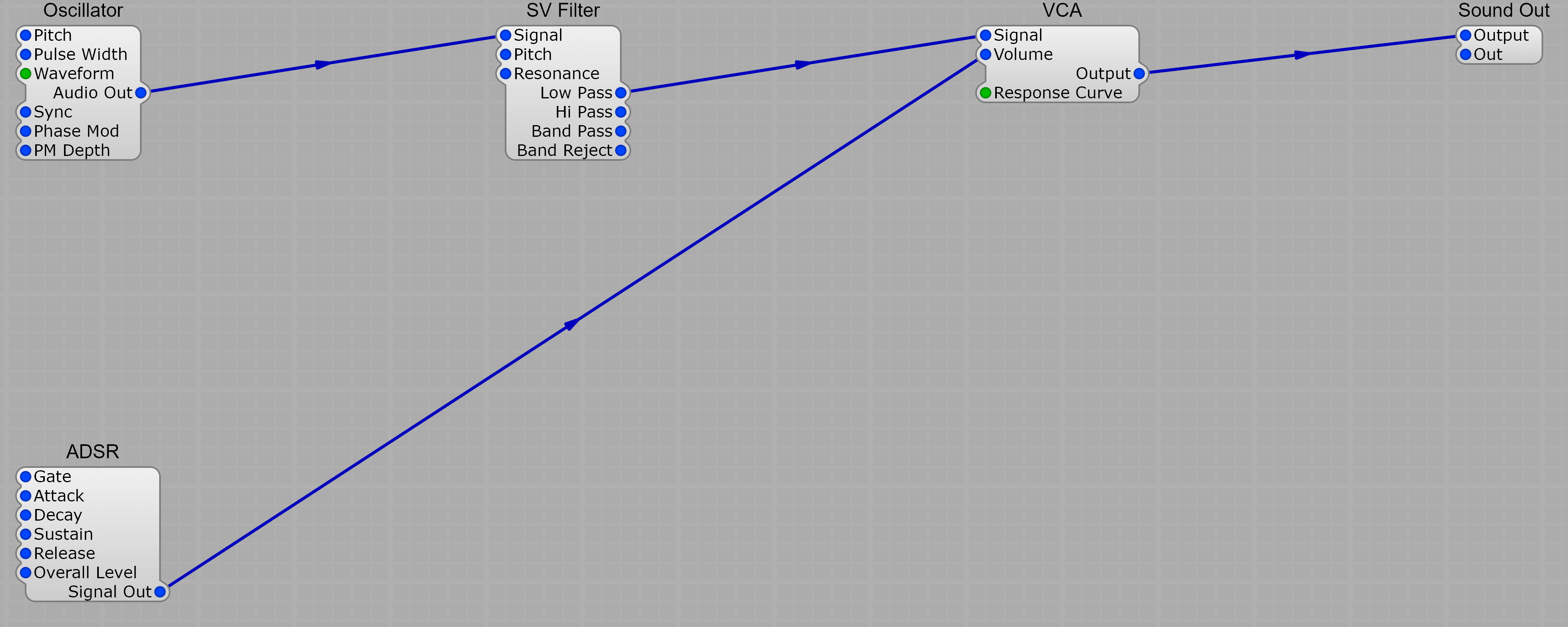
When the ADSR’s release phase ends, the VCA’s output flatlines at zero. The VCA detects the flat-line input and goes to sleep — and because the oscillator and filter are upstream of the VCA, they sleep too. CPU for that voice drops to near zero until the next note arrives.
Reducing Module Count
Section titled “Reducing Module Count”- Use the simplest module that does the job — a 1 Pole LP filter uses less CPU than an SV Filter
- Avoid unnecessary monitoring modules (Scope, Volt Meter) in finished patches
- Remove any unused modules
Polyphony Optimization
Section titled “Polyphony Optimization”- Place effects outside the voice container. Reverb, chorus, and delay should run once on the mixed output, not be cloned for each voice.
- Set appropriate voice counts. Don’t set 128 voices if your patch only needs 8. While unused voices sleep, the overhead isn’t zero.
- SynthEdit analyzes signal flow and only clones modules that actually need to be polyphonic.
Muting Modules
Section titled “Muting Modules”You can mute individual modules in Structure View to temporarily disable them. This is useful for debugging CPU usage — mute modules to see which ones are consuming the most resources.
Access via right-click > Mute in the Structure View.