
Slider2
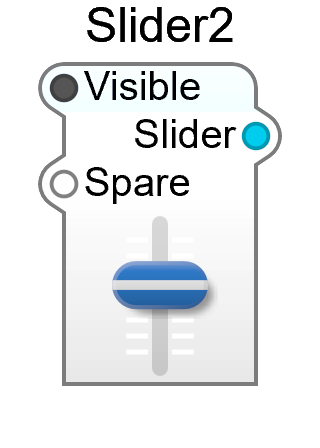
Slider2 is the slider you’ll use in practice: a draggable control that puts out a voltage, and remembers its position in the patch. It’s under Controls in the Module Browser.
Unlike most entries in the browser, Slider2 is a prefab rather than a single module — a small ready-made container holding a slider sub-control wired to a patch-memory module. That detail explains most of its behaviour, and one export gotcha.
| Pin | Type | Description |
|---|---|---|
| Visible | Bool | Shows or hides the control on the panel |
| Slider | Control | The slider’s value — wire this to whatever you want to control |
| Spare | — | The container’s spare input, for adding your own connections inside |
Connect Slider to the input you want to drive: an oscillator’s Pitch, a filter’s cutoff, a VCA’s Volume. Your First Synth uses one to sweep a filter.
The patch-memory module inside is what makes the slider more than a knob on screen:
- Its position is saved with the patch and restored with presets
- It is registered as a parameter, so a host DAW can automate it — with no Patch Automator needed
- The parameter takes its name from the pin it drives. Wire a Slider2 to a StateVar Filter’s Pitch and the host sees a parameter called StateVar Filter Pitch.
Parameters
Section titled “Parameters”Select the module and the properties panel shows the parameter behind it:
| Property | Description |
|---|---|
| Value | The slider’s current position, in volts |
| Low | Value at the bottom of travel (default 0.0) |
| High | Value at the top of travel (default 10.0) |
| Hint | Tooltip text |
| MIDI | MIDI controller assignment for the parameter |
| Ignore Program Change | Leave this control alone when the patch changes |
| Private | Hide the parameter from the host |
| Stateful | Save the value with the patch (on by default) |
Low and High are the ones you’ll reach for most: a slider driving a filter cutoff wants the full 0–10 V, while one trimming a level may want a much narrower range.
Slider2 deliberately draws no title on the panel — the parameter’s name appears in the host’s automation list, not on the GUI. Label the control on your panel with a text or image module if you want a visible caption; see Panel Design.
The container’s own pins — Controls on Module, Visible and Ignore Program Change — appear above the parameters, along with the usual container properties.
For the older, plain slider module see Slider.