
Introduction to SynthEdit
SynthEdit is a visual, modular synthesizer editor that lets you design and build your own virtual instruments and audio effects. By connecting modules together on a virtual canvas, you can create anything from simple synthesizers to complex audio processors — and export them as VST plugins.
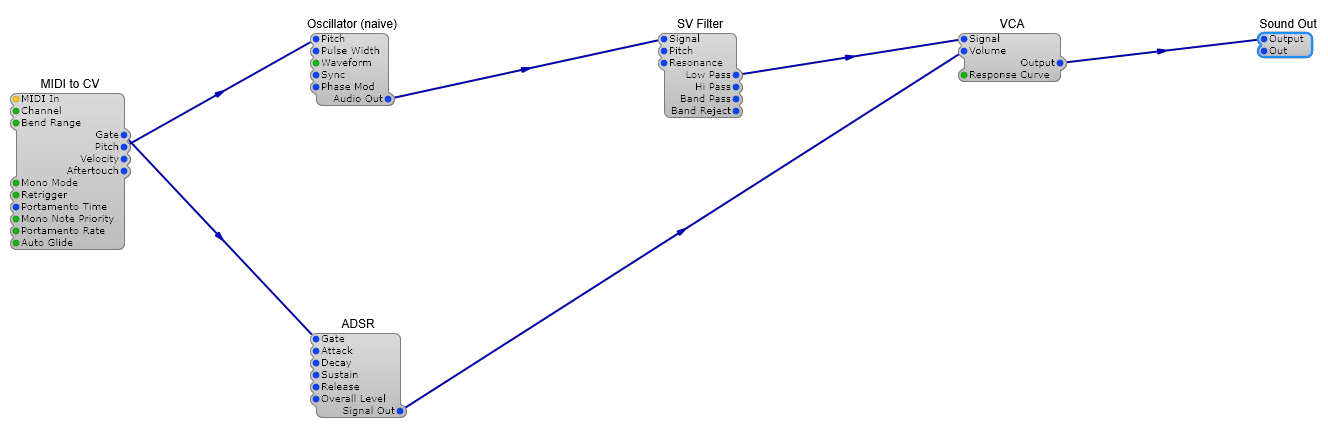
This is what a working synthesiser looks like in SynthEdit — modules wired together with patch cords. Each box is a module that does one job (generate a tone, shape a note, control volume), and the cords show signal flowing from one module’s output into another’s input.
What Can You Build?
Section titled “What Can You Build?”- Virtual synthesizers — subtractive, additive, FM, wavetable, and hybrid designs
- Audio effects — reverbs, delays, distortion, chorus, EQ, and more
- MIDI utilities — arpeggiators, chord generators, MIDI filters
- Experimental instruments — granular processors, generative music tools, custom controllers
How It Works
Section titled “How It Works”SynthEdit uses a modular patching approach:
- Place modules on the canvas — oscillators, filters, envelopes, etc.
- Connect them by dragging cables between module inputs and outputs
- Adjust parameters using knobs, sliders, and other controls
- Design the GUI with a built-in visual editor
- Export as VST to use your creation in any DAW
System Requirements
Section titled “System Requirements”- Windows 10 or later (64-bit)
- A VST3-compatible DAW for testing exported plugins
Next Steps
Section titled “Next Steps”- Install SynthEdit to get started
- Build your first synth with a step-by-step tutorial