
Containers & Prefabs
Containers and prefabs help you organize complex patches and reuse common configurations.
Containers
Section titled “Containers”A Container is a special module that groups other modules together. Containers serve two main purposes:
- Organization — Group related modules to keep your patch tidy
- Polyphony control — Each container can have its own polyphony setting
Creating a Container
Section titled “Creating a Container”To create a container from existing modules:
- Select the modules you want to group
- Choose Edit > Containerise Selection
This wraps the selected modules into a new container, automatically creating the necessary I/O connections.
Navigating Containers
Section titled “Navigating Containers”- Double-click a container’s title bar to open it and see its contents (Structure View)
- Right-click a container and choose Panel Edit to see its Panel View
- Use the breadcrumb navigation or Structure View to move between container levels
Container I/O
Section titled “Container I/O”When you connect a patch cord to a module inside a container from outside (or vice versa), SynthEdit automatically creates an IO Mod (virtual connection point). These IO Mods appear as plugs on the container’s exterior and use no CPU.
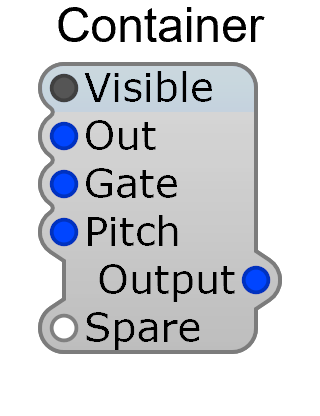
Once containerised, the modules inside collapse into a single block at the parent level — the auto-generated input/output pins on its exterior are exactly the connections that crossed the container boundary.
Container Properties
Section titled “Container Properties”| Property | Description |
|---|---|
| Polyphony | Number of voices (1–128) |
| Controls on Parent | Display this container’s panel controls on the parent’s panel |
| Controls on Module | Show panel controls directly on the container module in Structure View |
| Ignore Program Change | Prevent MIDI program changes from affecting this container’s controls |
Prefabs
Section titled “Prefabs”Prefabs are pre-built containers with modules already connected for a specific function. They save time by providing ready-made building blocks.
Examples of prefabs include:
- Delay units
- FM synthesizer voices
- Complete polyphonic synthesizers
- Common utility configurations
Inserting a Prefab
Section titled “Inserting a Prefab”Insert prefabs the same way as regular modules — through the Insert menu. Prefabs appear alongside standard modules in the module list.
Controls on Parent
Section titled “Controls on Parent”The Controls on Parent property lets a container’s panel controls appear on its parent container’s panel. This is how you build complex, multi-section synthesizer panels — each section (oscillator, filter, envelope) lives in its own container, but all controls appear together on the main panel.