
FM Synthesis
Frequency Modulation (FM) synthesis produces complex timbres by using one oscillator to modulate the frequency (or phase) of another. Popularized by the Yamaha DX-7, FM synthesis excels at bell-like tones, electric pianos, basses, and metallic textures.
Basic Concept
Section titled “Basic Concept”In FM synthesis, a modulator oscillator’s output modulates the phase of a carrier oscillator:
- Carrier — The oscillator you hear. Its base frequency determines the pitch.
- Modulator — The oscillator that modulates the carrier. Its frequency and amplitude shape the timbre.
Phase Modulation vs. Frequency Modulation
Section titled “Phase Modulation vs. Frequency Modulation”SynthEdit’s oscillator uses phase modulation (PM) rather than true frequency modulation. Phase modulation produces the same results as FM synthesis but is simpler to control — the pitch stays stable regardless of modulation depth. This is the same approach used by the Yamaha DX-7.
Building an FM Patch
Section titled “Building an FM Patch”Simple Two-Operator FM
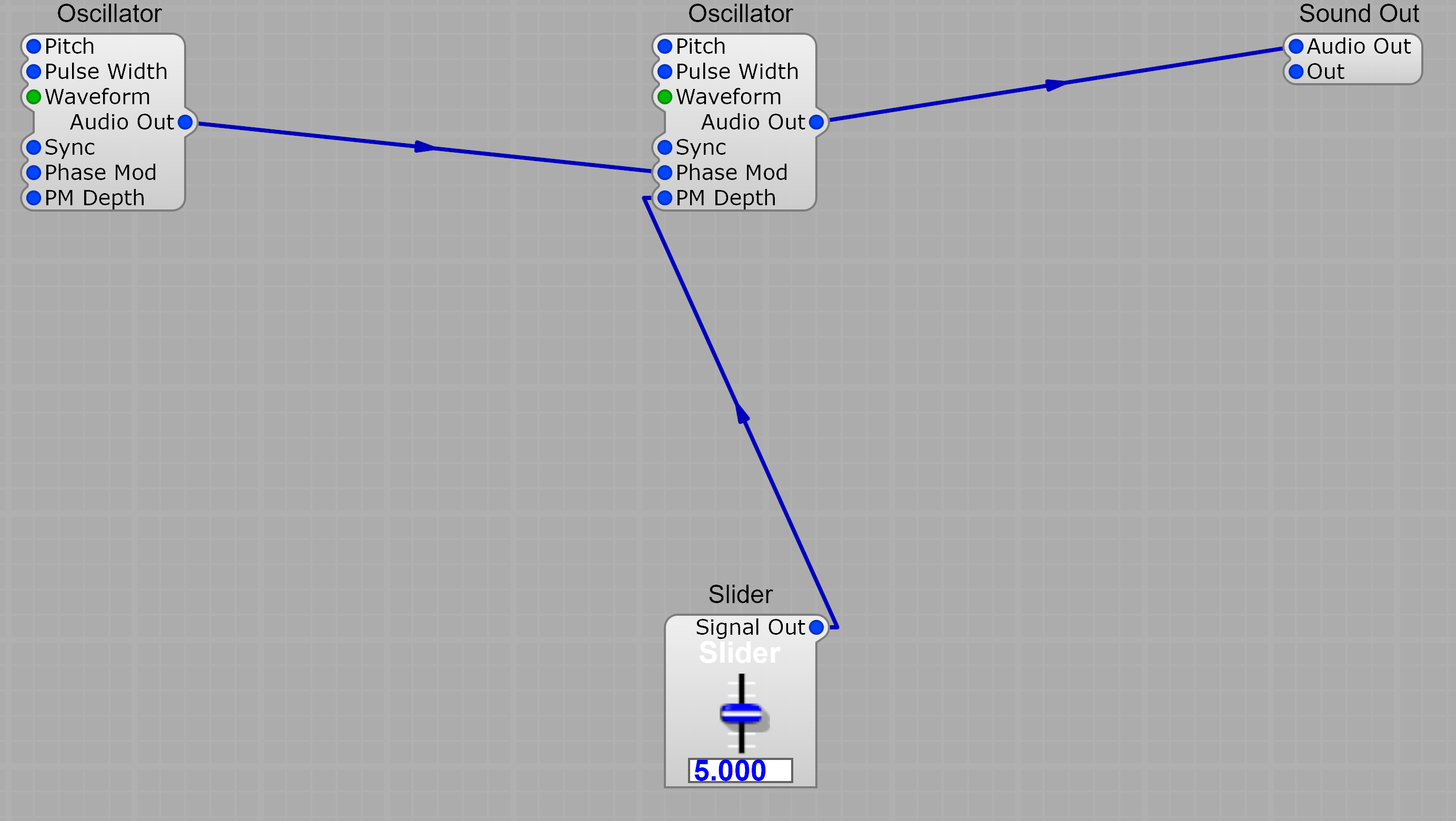
Section titled “Simple Two-Operator FM”The smallest useful FM patch chains a modulator into a carrier’s Phase Mod input, with a slider on PM Depth for brightness/timbre control:
- Insert two Oscillator modules
- Connect the modulator’s Audio Out to the carrier’s Phase Mod input
- Add a Slider and connect its Signal Out to the carrier’s PM Depth input (this is the timbre control — more depth = more harmonics)
- Connect the carrier’s Audio Out to a Sound Out module
- (Optional) connect a MIDI to CV module’s Pitch output to both oscillators’ Pitch inputs so the patch tracks your keyboard
- (Optional) replace the slider with an ADSR envelope for a time-varying timbre — high modulation on the attack that fades produces classic FM percussion and bell sounds
Adjusting the Sound
Section titled “Adjusting the Sound”- Modulator frequency controls the harmonic spacing — try detuning by octaves or specific ratios (2:1, 3:2, 4:1)
- Modulation depth controls brightness — more modulation adds more harmonics
- Envelopes on modulation depth create evolving timbres — high modulation on attack that fades produces percussive, bell-like sounds
Operator Configurations
Section titled “Operator Configurations”FM synthesizers typically chain multiple oscillators (called “operators”) in various arrangements called algorithms. SynthEdit doesn’t lock you into a fixed algorithm — you wire whatever topology you want.
Stack — modulator → modulator → carrier
Section titled “Stack — modulator → modulator → carrier”Each modulator modulates the next operator down the chain. The deeper the stack, the more complex the spectrum.

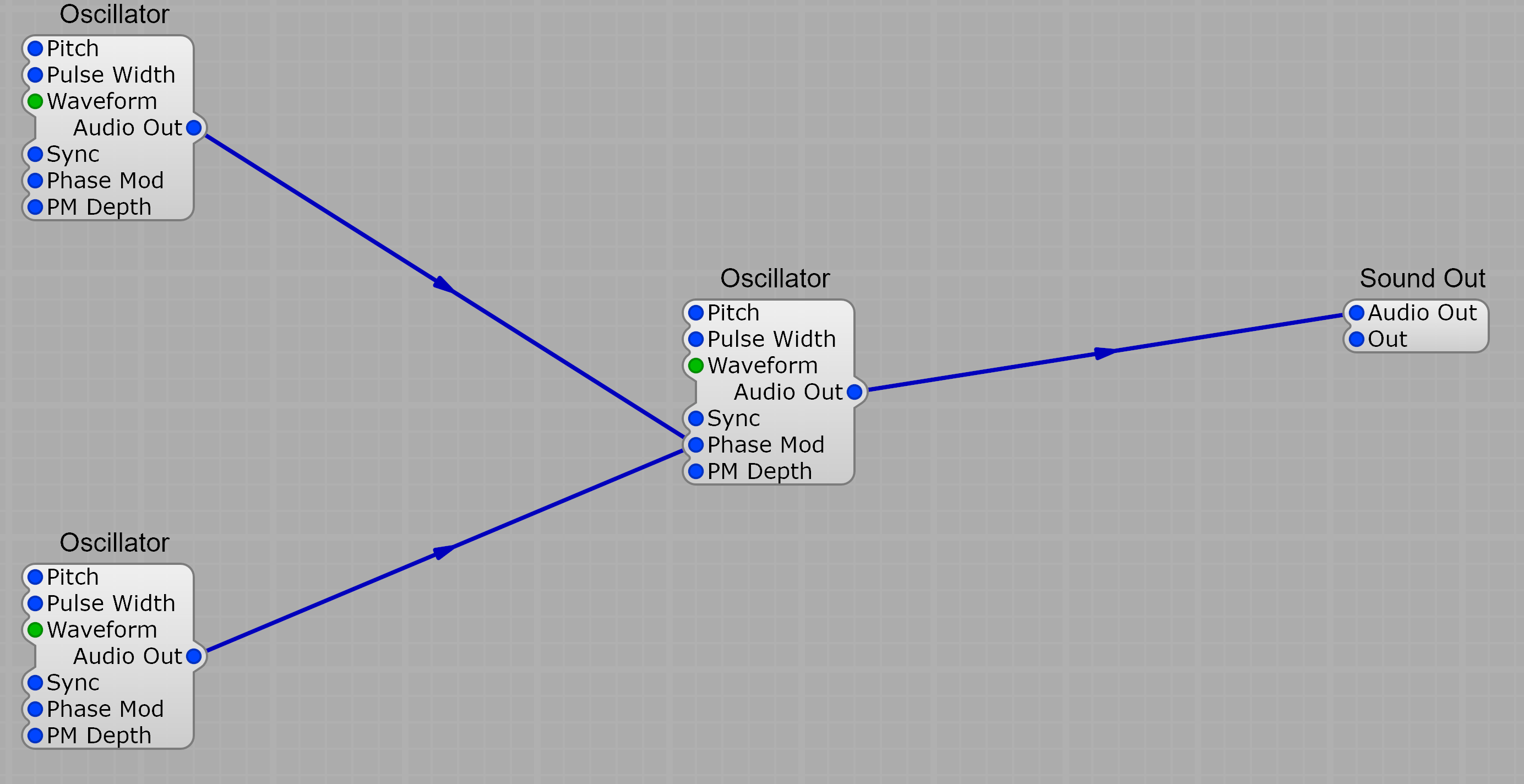
Parallel — multiple modulators feeding one carrier
Section titled “Parallel — multiple modulators feeding one carrier”Two (or more) modulators both drive the same carrier’s Phase Mod input. SynthEdit sums the modulator signals automatically, so you can route several Audio Outs into a single Phase Mod input. The result is an additive-like richness on top of the carrier.
Branch
Section titled “Branch”Combine stack and parallel paths — for example, one operator modulating two carriers, or a stack whose output is then summed in parallel with a second modulator. There’s no fixed structure; you have complete freedom to design your own operator topologies.
- Use sine waves for the cleanest FM tones (as in classic DX-7 patches)
- Sawtooth or pulse modulators create harsher, more aggressive timbres
- Small frequency ratios (1:1, 2:1, 3:1) produce harmonic tones; non-integer ratios (1:1.41) produce inharmonic, bell-like sounds
- Modulate the modulation depth with an ADSR envelope for time-varying timbres