
Signal Types & Levels
SynthEdit uses color-coded patch cords and plugs to distinguish between different signal types. Understanding these types is essential for building patches correctly.
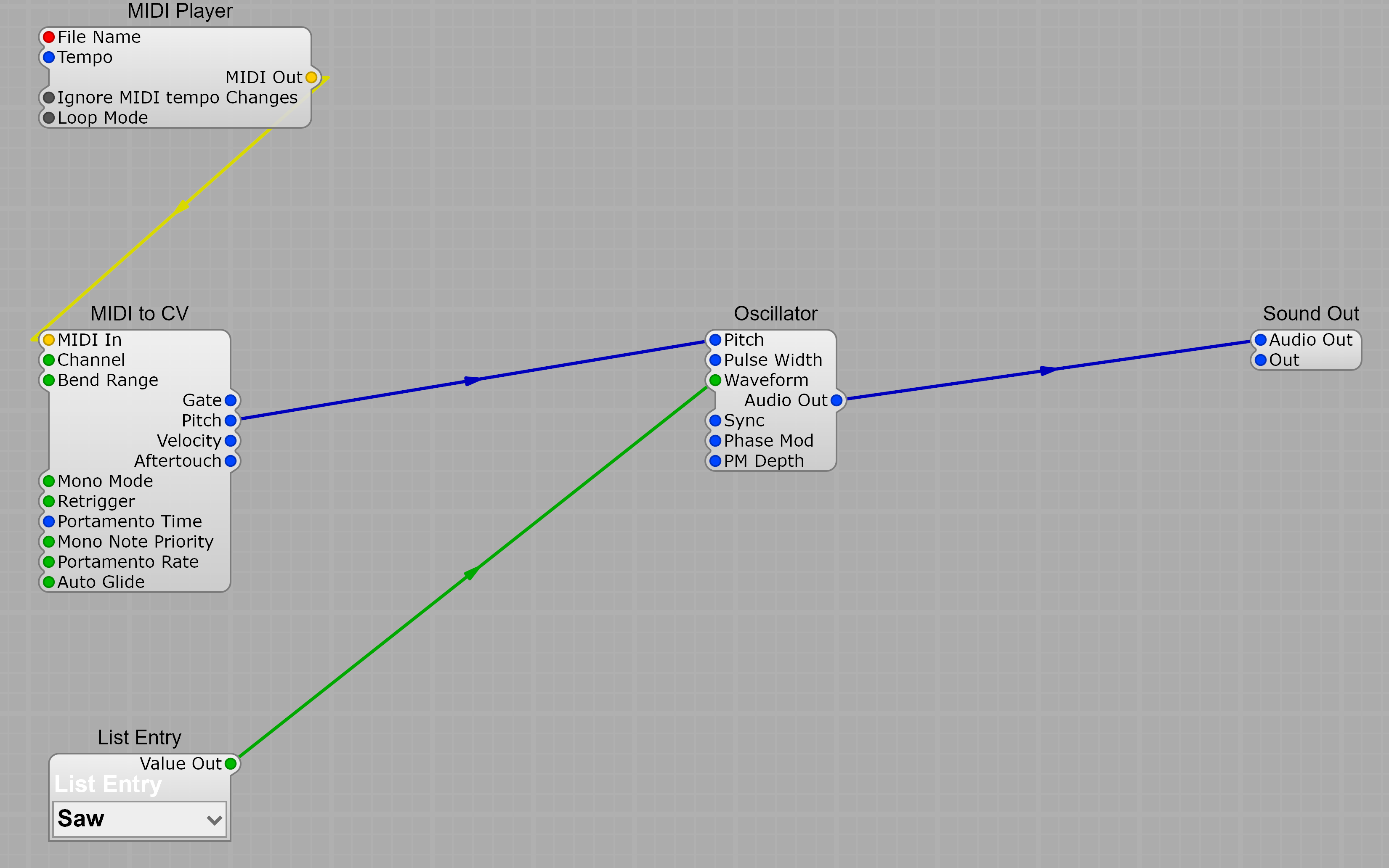
Signal Types
Section titled “Signal Types”| Color | Type | Description |
|---|---|---|
| Blue | Audio / Control Voltage | Audio signals and control voltages (pitch, gates, envelopes) |
| Red | Text | Text data such as filenames |
| Green | List | Lists of values (e.g., waveform names, menu items) |
| Yellow | MIDI | MIDI message data |
SynthEdit prevents you from connecting incompatible signal types — only matching colors can be connected.
Plugs are the connection points on each module:
- Input plugs appear on the left side of a module
- Output plugs appear on the right side
- You cannot connect two inputs together or two outputs together
Voltage Conventions
Section titled “Voltage Conventions”SynthEdit uses standardized voltage ranges throughout:
Pitch: 1 Volt per Octave
Section titled “Pitch: 1 Volt per Octave”Pitch signals follow the 1V/octave standard:
- 5V = 440 Hz (Middle A / A4)
- Each 1V increase doubles the frequency (one octave up)
- Each 1V decrease halves the frequency (one octave down)
Conversion formulas:
| Conversion | Formula |
|---|---|
| Volts to Hz | Hz = 440 × 2^(Volts - 5) |
| Hz to Volts | Volts = log2(Hz / 440) + 5 |
| MIDI Note to Volts | Volts = (MIDI Note / 12) + 0.25 |
| Volts to MIDI Note | MIDI Note = (Volts - 0.25) × 12 |
Amplitude: 0–10V
Section titled “Amplitude: 0–10V”Most amplitude and control signals use a 0–10V range:
- 10V = full volume / maximum
- 0V = silence / minimum
Gate Signals
Section titled “Gate Signals”Gates use simple on/off voltages:
- 5V = ON (gate open)
- 0V = OFF (gate closed)
Logic Levels
Section titled “Logic Levels”Logic gates use hysteresis for noise immunity:
- ON threshold: 3.33V
- OFF threshold: 1.66V
- Logic HIGH output: 5V
- Logic LOW output: 0V
This means a signal must rise above 3.33V to register as ON, but must fall below 1.66V to register as OFF. The gap between these thresholds prevents noise from causing false triggers.
VCA Response Curves
Section titled “VCA Response Curves”The VCA module supports different response curves for volume control:
| Curve | Behavior |
|---|---|
| Linear | Direct voltage-to-amplitude mapping |
| Exponential | More natural-sounding volume response |
| Decibel | Logarithmic scale matching audio perception |
Envelope Time Conversions
Section titled “Envelope Time Conversions”ADSR envelope times are controlled by voltage:
- Time values are exponential — each 1V increase doubles the time
- Negative voltages produce shorter times