
Using SynthEdit with a DAW
SynthEdit is a synthesizer editor, not a sequencer. To compose music, you’ll typically use it alongside a DAW (Digital Audio Workstation) or sequencer.
Two Integration Methods
Section titled “Two Integration Methods”1. MIDI Files (Recommended)
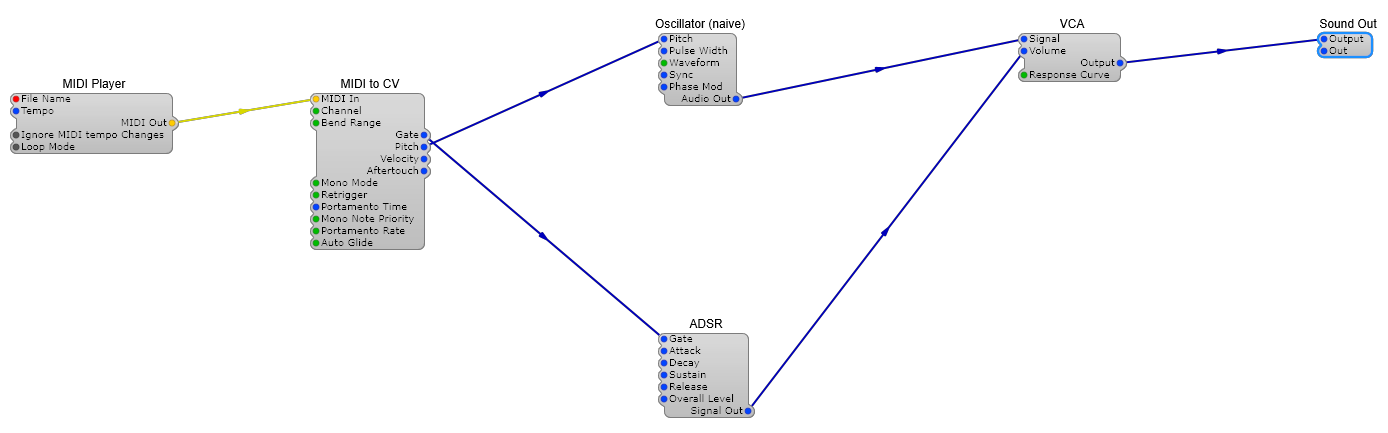
Section titled “1. MIDI Files (Recommended)”Load a MIDI file directly into SynthEdit using the MIDI Player module:
- Insert a MIDI Player module
- Set its File Name property to your
.midfile - Connect its MIDI output to your synth
Advantages:
- Rock-solid timing — no latency between the sequencer and SynthEdit
- Consistent playback results
- Works well with Render to Disk for offline bouncing
2. MIDI Loopback (Real-Time)
Section titled “2. MIDI Loopback (Real-Time)”Use a virtual MIDI cable to route MIDI from your DAW into SynthEdit’s MIDI input in real time:
- Install a MIDI loopback driver (virtual MIDI cable software)
- Set your DAW’s MIDI output to the loopback port
- Set SynthEdit’s MIDI In module to receive from the loopback port
Considerations:
- Subject to audio latency from your system’s buffer settings
- Minimize latency by using ASIO drivers and small buffer sizes
- Match sample rates between your DAW and SynthEdit
3. VST Plugin (Best Integration)
Section titled “3. VST Plugin (Best Integration)”For the tightest integration, export your SynthEdit project as a VST plugin and load it directly in your DAW:
- Design your synth in SynthEdit
- Export as VST3 via File > Save As VST
- Load the VST plugin in your DAW
This gives you full DAW automation, preset management, and seamless audio routing.
Performance Tips
Section titled “Performance Tips”- Use ASIO drivers for the lowest latency
- Match sample rates between SynthEdit and your DAW
- If your synth is too CPU-intensive for real-time playback, use Render to Disk to bounce audio offline
- Mute unused modules to free up CPU during playback
ASIO (Audio Stream Input/Output) is a driver protocol by Steinberg that provides low-latency audio. Check your soundcard manufacturer’s website for ASIO drivers. ASIO significantly reduces the delay between playing a note and hearing the sound.