
Polyphony
SynthEdit supports polyphonic synthesis, allowing you to play multiple notes simultaneously — just like a real keyboard.
How Polyphony Works
Section titled “How Polyphony Works”By default, SynthEdit provides 6 voices of polyphony (configurable up to 128). When a container includes a MIDI-to-CV module, SynthEdit automatically clones all the necessary modules to create multiple independent voices.
SynthEdit analyzes the signal flow within a container and only clones the modules that actually need to be polyphonic. Modules after a Voice Combiner (such as reverb or chorus effects) remain monophonic, saving CPU.
Setting Up Polyphony
Section titled “Setting Up Polyphony”- Place a MIDI-to-CV module inside the container that holds your synth voice
- Connect its outputs (Gate, Pitch, Velocity) to your synthesis modules
- Set the container’s Polyphony property to the desired voice count
The MIDI-to-CV module acts as the “voice allocator” — it receives MIDI notes and distributes them across the available voices.
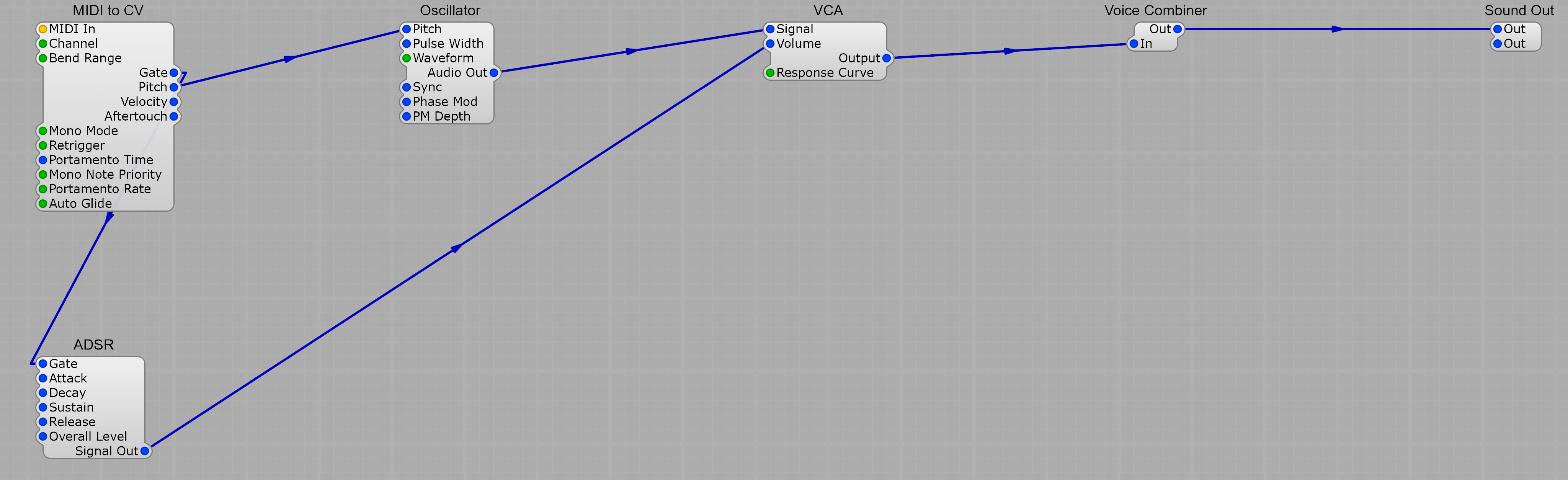
Everything to the left of the Voice Combiner (oscillator, filter, envelope, VCA) gets cloned per voice. Everything to the right (typically effects like reverb and chorus) stays monophonic — that’s the per-voice / global split.
Voice Count
Section titled “Voice Count”Configure the number of voices in the container’s properties:
- Default: 6 voices
- Maximum: 128 voices
- Higher voice counts use more CPU proportionally
Sleep Mode
Section titled “Sleep Mode”SynthEdit automatically suspends voices that are not currently active. When a note finishes its release phase and the signal drops to silence, that voice enters “sleep mode” and uses almost no CPU. This means setting a high polyphony count has minimal impact when fewer voices are actually sounding.
Reserve Voices
Section titled “Reserve Voices”You can reserve a number of voices to prevent voice-stealing clicks. When all voices are in use and a new note arrives, SynthEdit steals the oldest voice. Reserved voices provide a buffer so that releasing notes can complete their release phase naturally.
Mono Mode
Section titled “Mono Mode”For lead synths and bass sounds, you can set polyphony to 1 for monophonic operation. This provides:
- Single-voice behavior
- Portamento (pitch glide between notes) via the MIDI-to-CV module’s Portamento Time setting
Common Pitfalls
Section titled “Common Pitfalls”- Place MIDI-to-CV in the correct container. It must be inside the container whose modules you want cloned polyphonically.
- Keep effects outside the voice container. Reverb, delay, and chorus should be placed after the Voice Combiner to avoid unnecessary CPU usage from polyphonic cloning.
- Don’t put MIDI-to-CV alone in its own container. It needs to be alongside the modules it controls.