
Feedback Paths
SynthEdit processes audio in blocks of samples for efficiency. This block-based architecture means that feedback loops (where a module’s output connects back to its own input) are not directly supported — the output of a block isn’t available until the block finishes processing.
The Feedback Delay Module
Section titled “The Feedback Delay Module”To create feedback effects (such as echo, flanging, or resonant feedback), use the Feedback Delay module. This module allows backward routing by introducing a small delay of approximately 100 samples (~2 ms at 44.1 kHz).
How It Works
Section titled “How It Works”- Place a Feedback Delay module in the feedback path
- Route the signal from later in the chain back through the Feedback Delay to an earlier point
- The module introduces a one-block delay, allowing the feedback loop to function
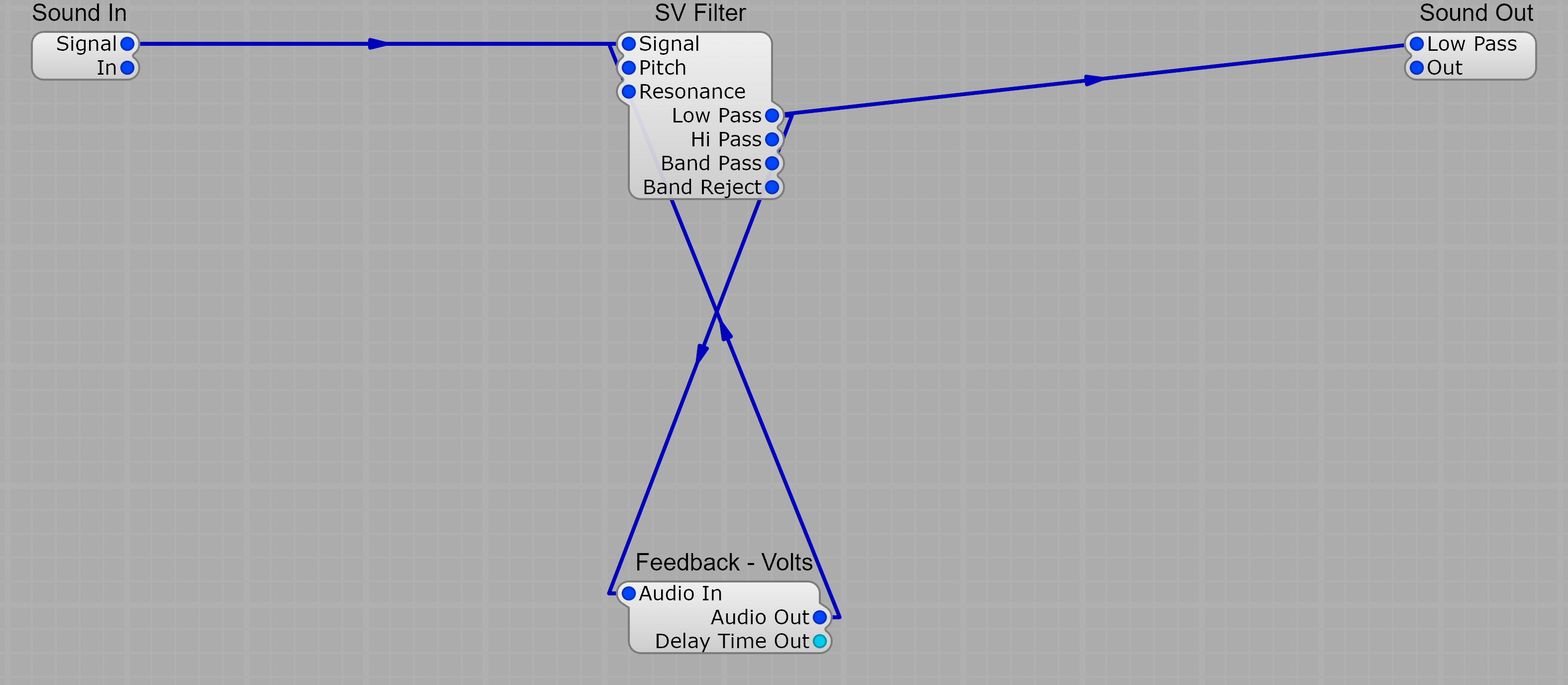
In this example the SV Filter’s output is fed back into its own input via the Feedback - Volts module, creating a resonant feedback path. Without the Feedback Delay, SynthEdit would refuse to make the backwards connection because it can’t resolve the dependency within a single processing block.
The Feedback Delay module also provides a Delay Time Out pin that reports the exact delay in milliseconds, which is useful for tuning delay-based effects.
Limitations
Section titled “Limitations”- The minimum feedback delay is one processing block (~96 samples)
- This delay is audible in very short feedback paths (like comb filtering)
- For longer delays (echo, reverb tails), the extra samples are negligible
- Standard delay modules handle their own internal feedback — you only need the Feedback Delay module for external feedback paths between separate modules
When You Don’t Need Feedback Delay
Section titled “When You Don’t Need Feedback Delay”The Delay module has its own Feedback input that handles internal feedback without needing the Feedback Delay module. Only use Feedback Delay when routing signals backward between separate modules in the patch.